
Are you double handling your income?
It’s common to inadvertently overstate your income, which can occur in the following scenario:
- Invoices are generated in your accounting software or imported from your CRM.
- AND the corresponding payments are received and reconciled directly to the revenue/sales account.
- This process can lead to a backlog of unpaid invoices and incorrect reporting of income in your sales account. Essentially, both the invoices and the payments are being counted, resulting in inflated income. This is known as double handling income.
If you manage your own bookkeeping and want to reduce your accounting costs at the end of the quarter or year, here’s how you can identify and rectify overstated income:
- Look for numerous open invoices that are overdue.
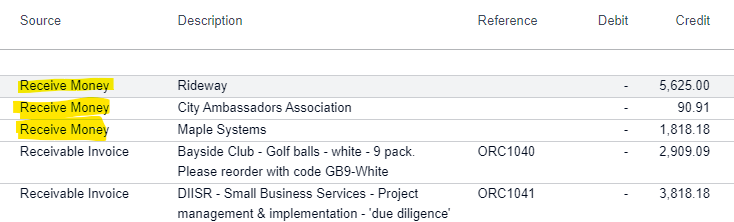
- Run an Account Transactions report and filter by your revenue/sales account. You should see transactions linked to sales invoices. Transactions categorised under ‘Receive Money’ may indicate payments received without corresponding invoices being closed.
- Investigate these transactions further and if required, undo the manual reconciliation and code them against your open invoice instead
(example of how your account transaction report might look like)
For any questions or assistance in preparing for your end-of-year financial reporting, feel free to book a complimentary 20-minute consultation call with us.